
Vehicle ownership transfer means updating the name of the owner in the Registration Certificate (RC) after selling or buying a vehicle. When a person buys a second-hand car or bike, it legally becomes theirs only after the RC is changed. The government records must show the correct owner because all responsibilities of the vehicle depend on the name written on the RC. If the RC is not transferred, the previous owner remains responsible for traffic fines, pollution violations, accidents and even criminal cases linked to the vehicle.
In India, the Motor Vehicles Act makes ownership transfer mandatory. Every state transport department uses the same rules, and the Parivahan website helps complete this process online. There are three types of ownership transfers: sale of the vehicle, death of the registered owner, and auctioned vehicles. The most common case is when a person sells their car or bike.
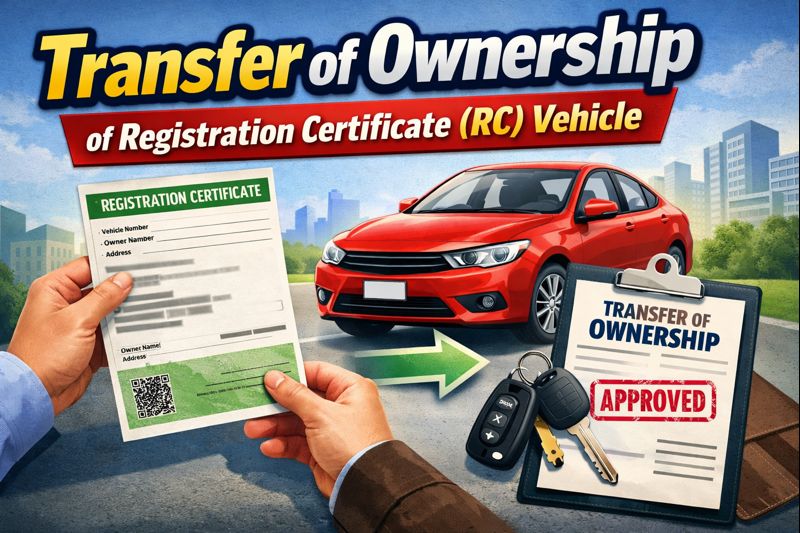
The transfer must be done within 14 days if the buyer lives in the same state and within 45 days if the buyer lives in another state. If you delay the process, you may have to pay a penalty. Once you complete the transfer, the new RC is issued in the buyer’s name, and the vehicle becomes legally theirs.
Transfer of Ownership of RC Vehicle 2025 : Fee, Check Status, Documents
Overview Table Transfer of Ownership of RC Vehicle
| Topic | Key Points |
|---|---|
| What it is | Changing owner name on vehicle RC |
| Who needs it | Buyer and Seller |
| Where to apply | RTO or Parivahan online portal |
| Required forms | Form 29 and Form 30 |
| Important docs | Original RC, Insurance, PUC, ID proofs |
| Extra for interstate | NOC from old RTO |
| Time taken | 30 to 90 days (approximate) |
| Why it matters | Legal responsibility and insurance issues |
How to Transfer of Ownership of RC Vehicle
You sold your car or bike but didn’t get the RC transferred. If the RC is not transferred, you can face legal issues. Until the transfer is complete, any challan or legal case will come under your name. In this video I’ll explain in a simple way how you can transfer your RC from home through the Parivahan portal. Stay till the end because there are some important tips you should know.
Visit the Parivahan Website
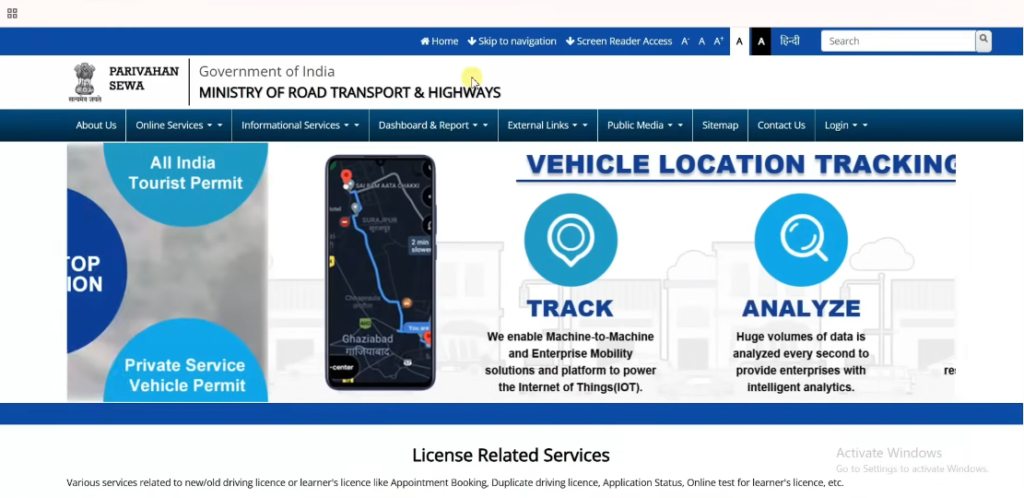
- To transfer the RC, first go to the website parivahan.gov.in. Scroll down and you will see an option called Vehicle Registration. Click on it.
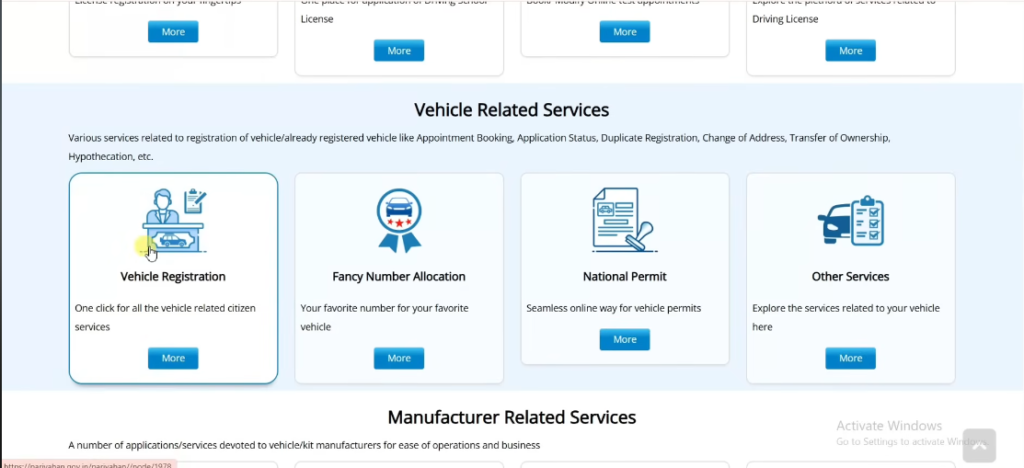
- After clicking, the vehicle-related services page will open. Select your state and then your RTO.
- You will see a box on the screen. Tick the box and click Proceed. Again click Proceed. A new page will open.
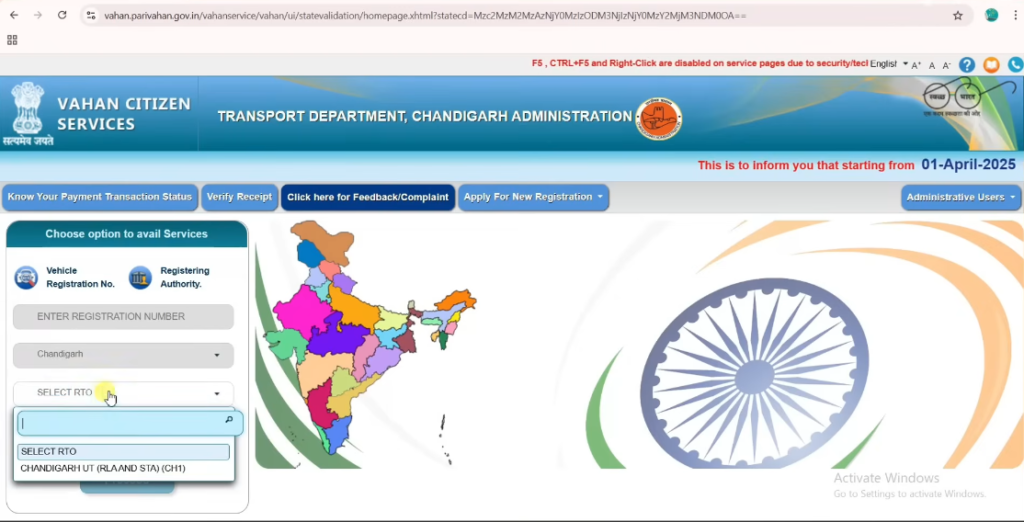
Apply as Seller for Transfer of Ownership
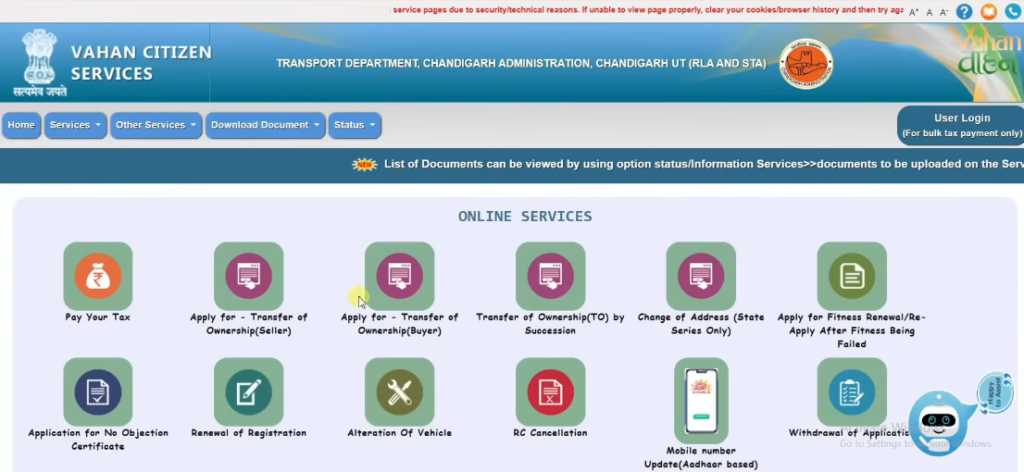
- You will see an option Apply for Transfer of Ownership Seller. Click on it. Read the important instructions shown on the screen.
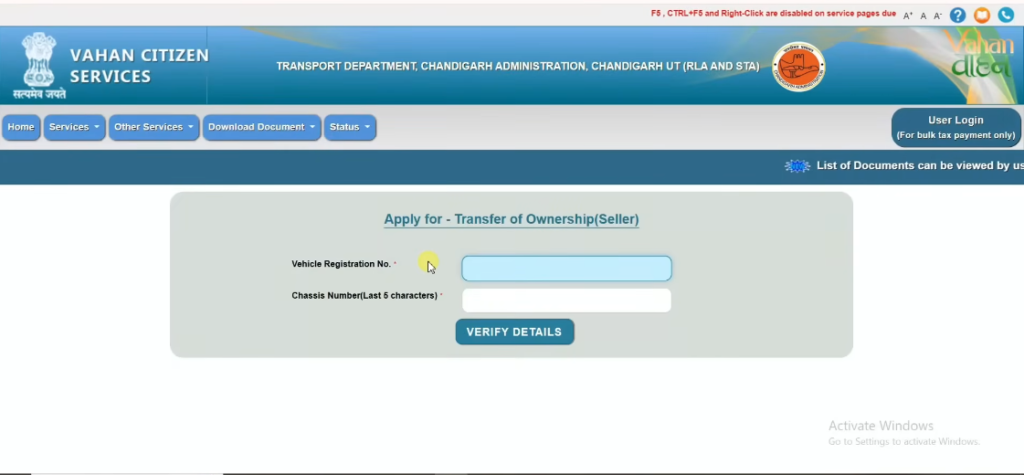
- Tick the box and click Proceed. You must now fill your vehicle details. Enter your vehicle registration number and the last five digits of the chassis number.
- Click Verify Details. You will see two OTP options: Using Mobile OTP or Using Aadhaar. Choose the one you prefer.
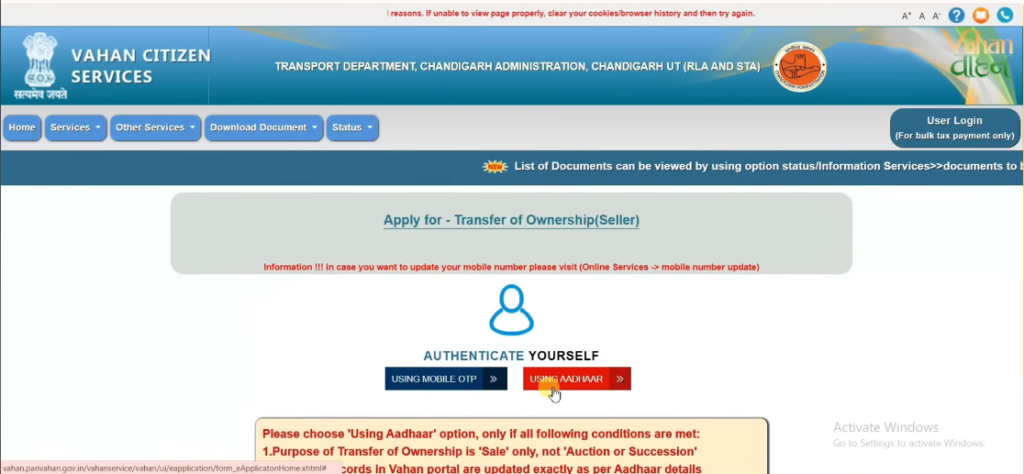
- you can select Mobile OTP. The last five digits of the registered mobile number will be visible. Click Generate OTP. Enter the OTP received on your phone and submit.
Fill the Application Form (Seller Details) For Transfer of Ownership
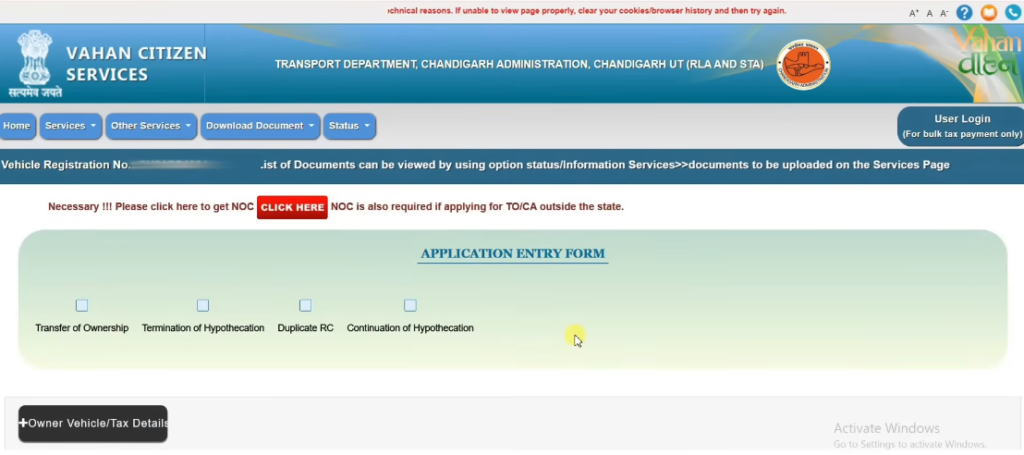
- The application form will now appear. Tick Transfer of Ownership. If your vehicle is financed, the option Termination of Hypothecation will already be selected.
- Two tabs will appear: Transfer of Ownership Details and Hypothecation Termination Details. Click only the first one.
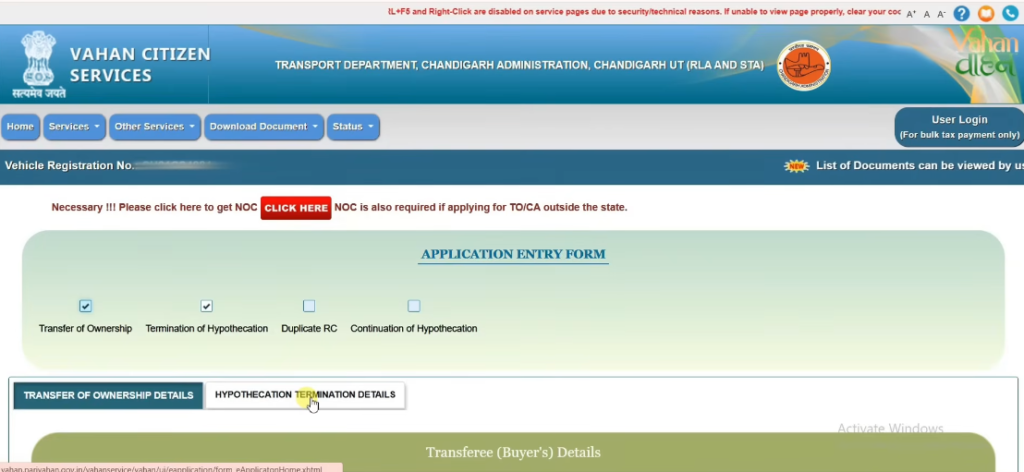
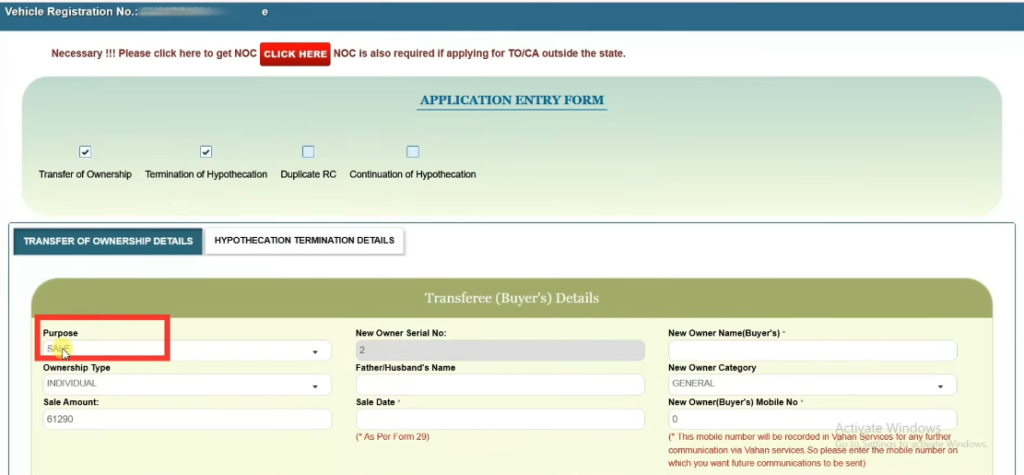
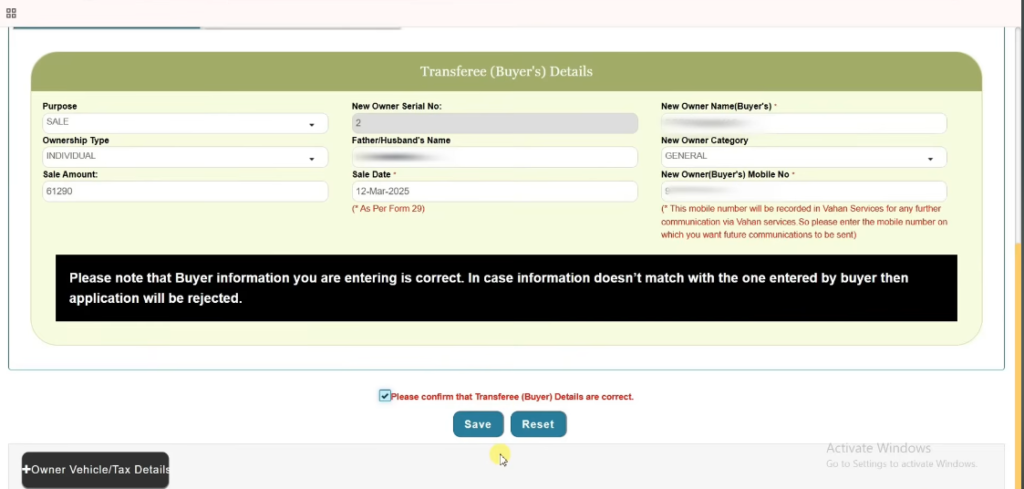
- Select the purpose of transfer. Since you sold the vehicle, the sale option will appear automatically. Enter the sale amount. Enter the buyer’s name, their father’s or husband’s name, sale date and the buyer’s mobile number. Tick the confirmation box stating that the details are correct. Save the information.
- If your vehicle was financed and the loan has been cleared, enter the loan closure date under Hypothecation Termination Details. Select Yes when asked if you want to terminate. If the vehicle was not financed, this option will not appear. After saving, your application number will be generated. Note it down. This completes the seller part.
Buyer’s Section
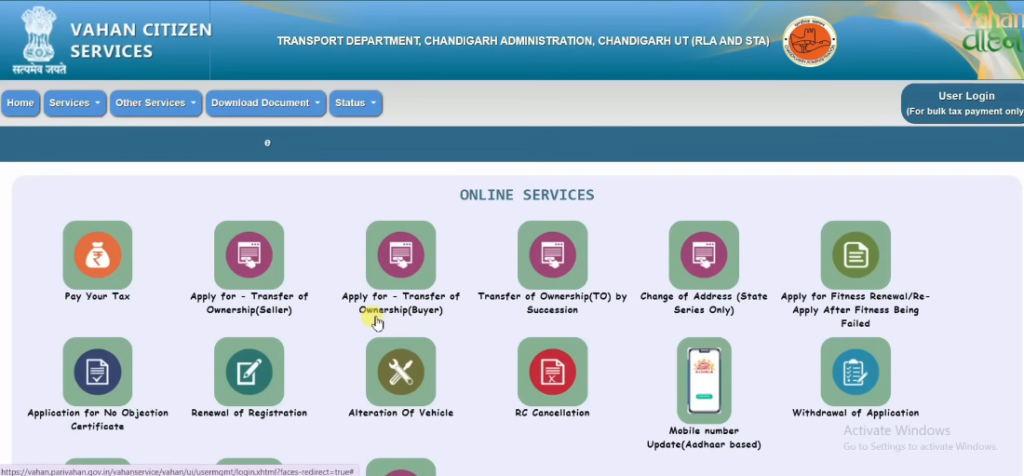
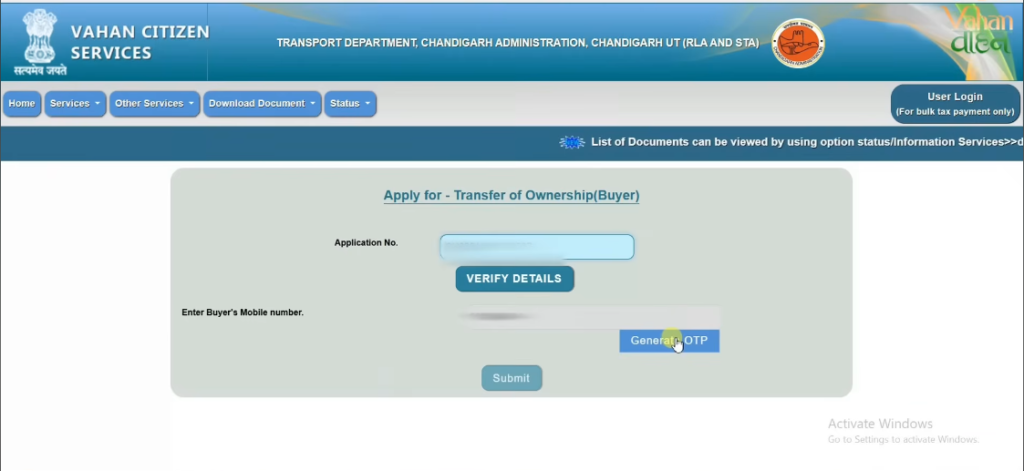
- Now we need to complete the second part for the buyer. Click Apply for Transfer of Ownership – Buyer. Tick the terms and conditions box and click Proceed. Enter the application number generated earlier and click Verify Details. Click Generate OTP. An OTP will be sent to the buyer’s mobile number. Enter the OTP and submit.
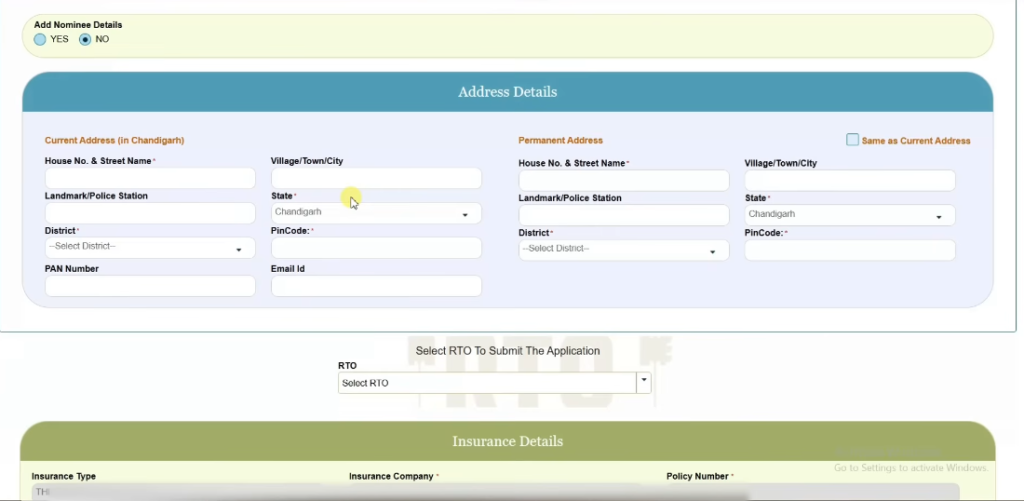
- A new interface will open. Scroll down and enter the buyer’s current address, including house number, landmark, district, PAN number, email ID, pincode, state and village if applicable. If the permanent address is the same, tick the box. Select the RTO.
Fee Details
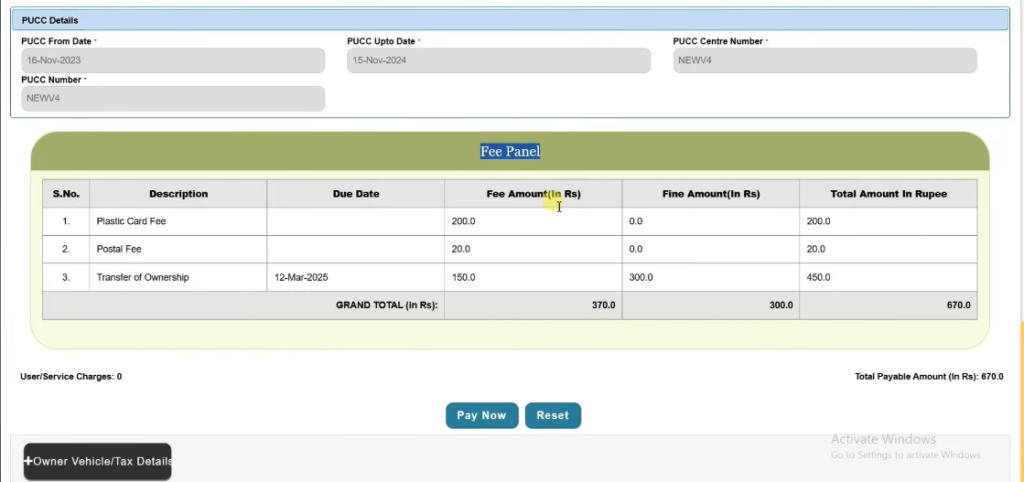
- You will now see the Fee Panel. Fees vary by state. In my case, the total fee is ₹670 (₹200 plastic card fee, ₹20 postal fee and ₹450 transfer fee). Click Pay Now. Read the instructions, tick the box and confirm.
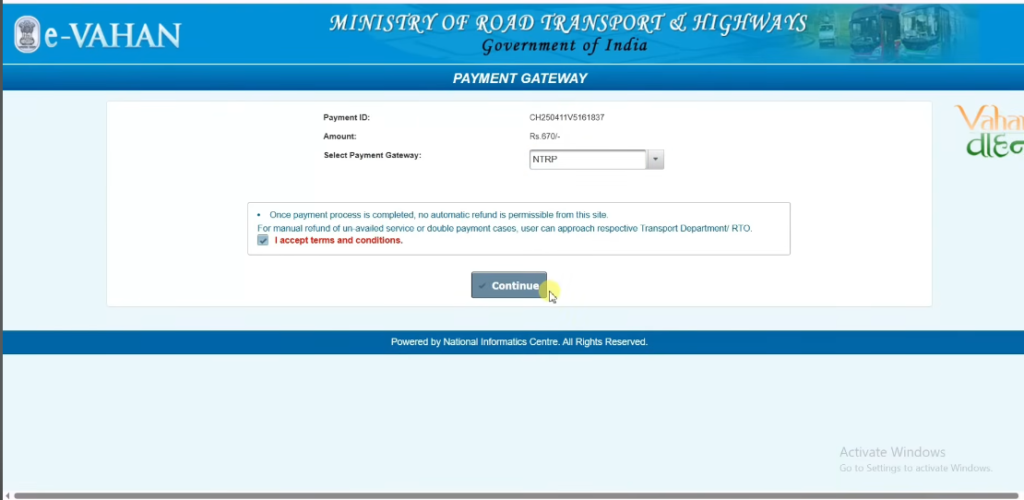
- Select the payment gateway NT RPY. Accept the terms and continue. Choose your bank and payment method such as net banking, debit card, credit card or UPI. Enter the captcha, accept the terms and click Pay.
Forms and Document Upload
- After payment, the page will open automatically and you will find Form 29, Form 30 and Form 35. You can print or save them as PDF.
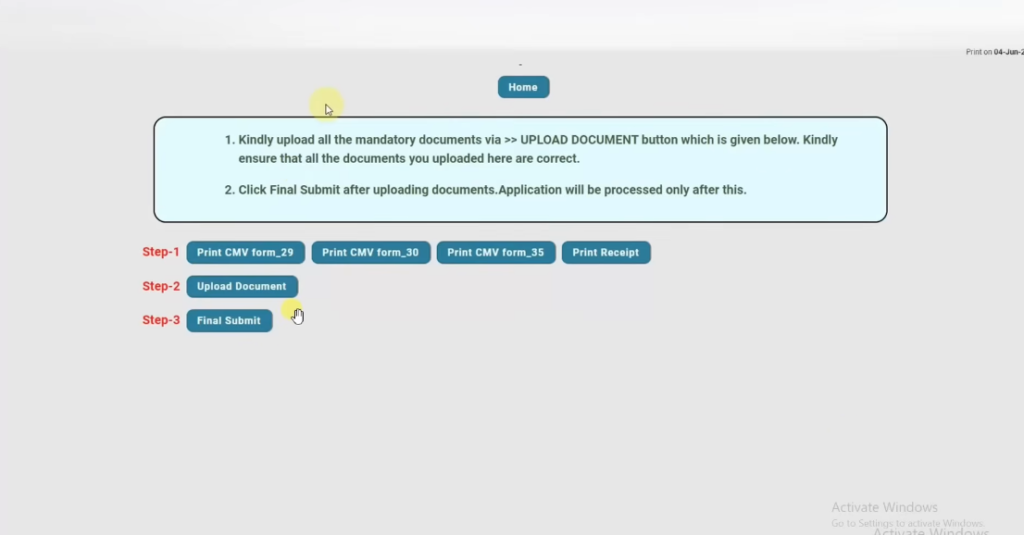
- Form 29 needs signatures from the vehicle owner. Digital signature can also be added.
- Form 30 needs signatures from both the seller and the buyer. If the vehicle was financed, the financer must sign for hypothecation termination.
- Form 35 requires the seller’s signature and the financer’s signature to confirm loan closure.
- Print the receipt and keep it safe.
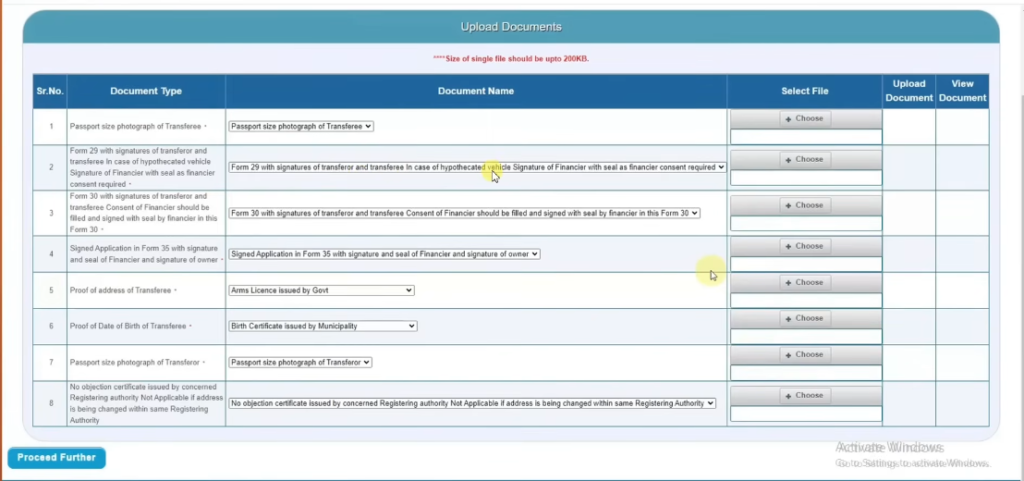
- Now click Upload Documents. Upload the buyer’s passport size photo. Upload signed Form 29, Form 30 and Form 35. Upload the buyer’s address proof. Choose any document from the list shown. Upload the buyer’s date of birth proof. Upload your own passport size photo. Upload the NOC if needed. After uploading everything, click Proceed Further.
Click Final Submit. Your application is now submitted.
Book Appointment and Check Status of Transfer of Ownership
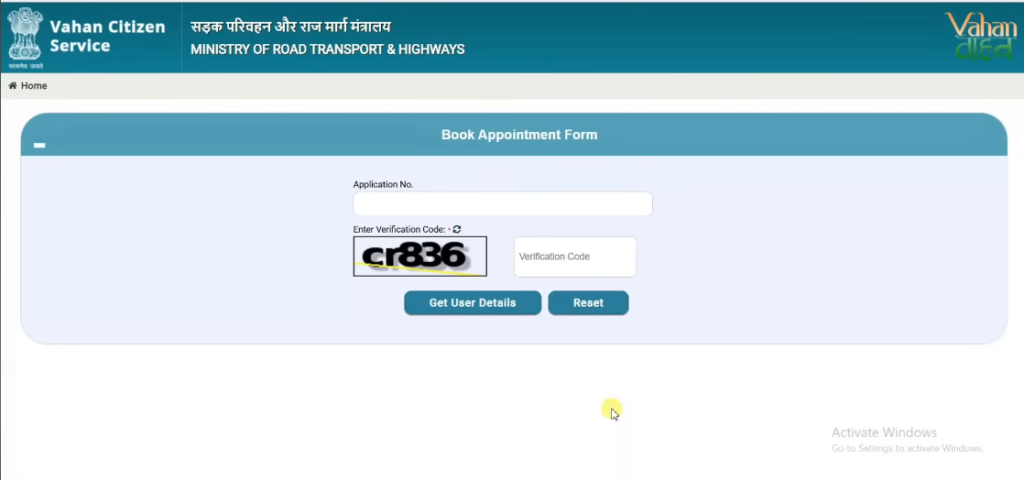
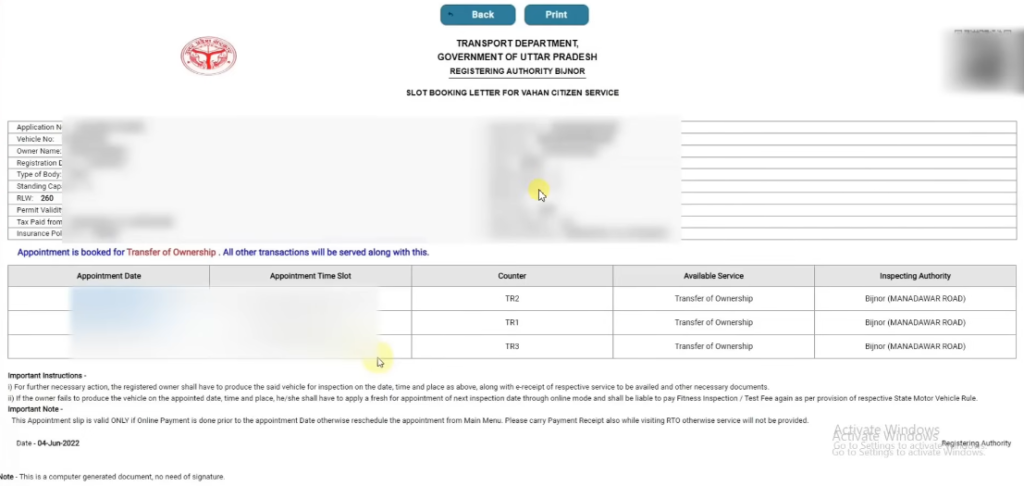
- Click Home and enter the application number and verification code to book an appointment. Choose the date that suits you. Save or print the appointment slip.
- Carry all required documents shown on the screen when you go to the RTO.
- To check your application status, use the Know Your Application Status option. You can also view or upload any pending documents if needed.
Why Ownership Transfer is Important
Ownership transfer is important for both the seller and buyer. If the RC remains in the seller’s name, they may receive all challans and legal notices. For example, if the new user breaks a traffic rule, the challan will reach the old owner. In 2023 alone, more than 10 crore e-challans were issued across India, which shows how common penalties are.
For buyers, a correct RC helps in getting insurance claims, selling the vehicle later and travelling without any legal worries. Police can even seize a vehicle if the documents do not match the driver’s details.
Types of Ownership Transfer
There are three main types:
- Normal Sale Transfer – When a vehicle is sold to another person.
- Ownership Transfer after Death – When the registered owner dies and the vehicle goes to a legal heir.
- Ownership Transfer of Auctioned Vehicles – For vehicles sold through government auctions.
Normal sale transfer accounts for more than 80 percent of total transfers in India.
Read also :Hypothecation Terminal, Removal 2026 : Online Status, Loan Clearence
Documents Required for Transfer
Here are the important documents:
- Original RC
- Form 29 and Form 30 (2 copies each)
- Valid insurance
- PUC certificate
- Address proof of buyer
- Passport-size photo of buyer
- Sale affidavit (if required)
- NOC from bank if loan was active (Form 35)
The PUC certificate is valid for 1 year for new vehicles and 6 months for old vehicles.
Fees and Charges for Ownership Transfer
The fees vary by state, but here are the common charges:
- Transfer fee: ₹300 for two-wheelers and ₹500 for four-wheelers
- Smart card fee: ₹200
- Postal fee (if applicable): ₹50 to ₹100
- Late fine: ₹300 per month in some states
If hypothecation removal is required, an extra ₹100 may be charged.
On average, the total cost becomes ₹600 to ₹900 for bikes and ₹800 to ₹1200 for cars.
Read also :Sarathi Account Is Locked: How to Unlock Your Parivahan Sarathi Login
Time Limit for Ownership Transfer
The Motor Vehicles Act sets clear timelines:
- 14 days if buyer and seller live in the same state
- 45 days if vehicle is sold across states
- 30 days for legal heirs in case of death of the owner
The RTO usually completes the approval within 7 to 30 days,
Why You Must Transfer Ownership
When you sell your vehicle, you must transfer the RC to the new owner. If you do not, the law still shows you as the owner. This means you may be responsible for traffic fines or accidents that happen after you sold the vehicle. It can also cause trouble when the new owner wants to renew insurance or pay road tax. Transferring ownership protects both the buyer and seller. The buyer gets legal proof of ownership.
This helps when renewing the RC or selling the vehicle later. The seller no longer has legal responsibility for the vehicle. The process also ensures that official records match real ownership details. It improves transparency and prevents fraud. If you do not complete transfer on time, the Regional Transport Office (RTO) may charge penalty fees. So transferring the RC on time keeps the vehicle records correct and avoids future problems.
Read also :How to Recover Your Parivahan Login Account
Who Is Involved in the Transfer
The transfer process involves two main people. First is the seller (existing owner) who sells the vehicle. Second is the buyer (new owner) who will take responsibility for the vehicle. Both parties must work together to complete the transfer. The seller must sign the required forms and hand over important documents like the original RC, insurance, and ID proofs. The buyer must fill out forms with his or her details.
Both must provide valid identity and address proofs such as Aadhaar card, passport, or voter ID. If your vehicle has a loan on it, then a bank’s No Objection Certificate (NOC) may also be needed before the transfer. This confirms the loan is closed or that the bank agrees to the transfer. In cases where the vehicle is moved to a new state, both buyer and seller may need to deal with two RTO offices. Ensuring clear communication and accurate documentation between both parties makes the transfer smoother.
Where to Apply for Transfer
You can apply for transfer of ownership in two ways:
- Online through the Parivahan portal
You visit the official transport website (parivahan.gov.in). You log in with your mobile number and follow steps to submit forms and upload documents digitally. This is easier and saves time. After submission, you can track the status online. - Offline at your local RTO
Both buyer and seller can visit the Regional Transport Office where the vehicle is registered. You submit the required forms and documents in person. After verification, RTO updates the records.
Online applications are becoming more popular because they reduce paperwork and allow digital tracking. However, in some areas, physical RTO visits are still required to submit documents or complete verification.
Online vs Offline Transfer
Both online and offline options are available:
- Online Transfer
You can apply and pay fees online through Parivahan. You upload digital copies of documents and track the status from anywhere. - Offline Transfer
You physically go to the RTO with all original documents. Some RTOs still require in-person submission.
Online transfer saves time and reduces paperwork, but you may still need to visit the RTO if original documents must be shown. Offline transfer gives direct contact with officials and can be useful if you have complex cases, like interstate
Read also :Temporary Vehicle Registration in India (2026) – What It is, How It Works & Key Rules
Common Challenges and Tips
Here are some issues you may face:
- Missing Documents
If any papers are incomplete, the RTO may reject your application. - No NOC for Interstate Transfer
Moving a vehicle to another state needs a No Objection Certificate from the old RTO. - Loan or Hypothecation
If the vehicle loan is not closed, you need a bank’s NOC.
Tips to avoid problems
- Double-check all forms and signatures before submission.
- Keep copies of everything you submit.
- Track your application online on the Parivahan portal.
Legal Importance of Transfer
Vehicle transfer is not just a formality. It has legal value. Until transfer is completed, the old owner may be held responsible for traffic violations, insurance claims, and legal matters involving the vehicle. If you inherit a vehicle, the transfer ensures that you have the legal right to own and use it. The RTO records must always show the correct owner. This protects both buyer and seller in future legal matters and keeps national vehicle records accurate and up to date.
Frequently Asked Questions (FAQs)
Q1. Can I transfer ownership online?
Yes. You can apply through the Parivahan online portal by uploading documents and paying fees online. Keep your mobile number and documents ready for verification.
Q2. What forms are needed for transfer?
Two main forms are required: Form 29 (seller notification) and Form 30 (application by buyer). Both must be signed properly.
Q3. What is a NOC and when is it needed?
A No Objection Certificate (NOC) from the old RTO is needed when the vehicle is being transferred to a different state or RTO area.
Q4. Do I need to pay all pending fees before transfer?
Yes. Recent rules say the transport department may not give NOC until all unpaid fees, like tolls or taxes, are cleared.
Q5. How long does transfer take?
It usually takes 30 to 90 days depending on document accuracy and RTO workload.