
Hypothecation on a vehicle means that when you buy a car or bike using a loan from a bank or financial institution, the vehicle acts as security for the loan. Although you can use and drive the vehicle, legally the lender has a claim over it. The lender’s name or lien appears on your vehicle’s Registration Certificate (RC) this shows that the car or bike is under loan/hypothecation.
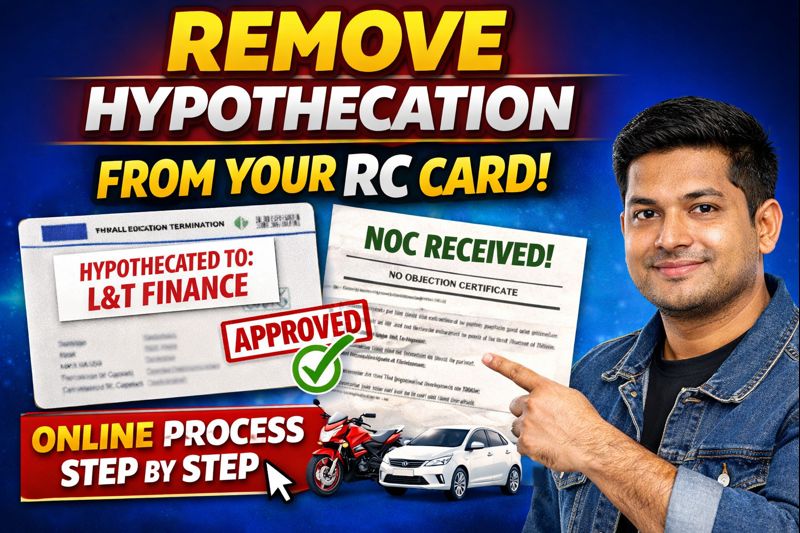
A. If you have loan, your RC shows lender’s interest not full ownership.
B. You can’t treat the vehicle as fully yours for legal ownership until loan closure and removal of hypothecation.
C. Once loan is repaid, you must process hypothecation removal to get clean ownership records.
D. Hypothecation ensures lender’s security; it is common when buying vehicles on loan.
E. Until removed, RC will reflect hypothecation status; this may appear as “HP” or lender name/endorsement depending on state RTO norms.
Thus hypothecation is a legal arrangement that protects the lender’s interest until you repay the full loan.
Parivahan Quick Actions (Official Links)
Use official government portals and apps for driving licence and vehicle related services.
This is an informational website. All buttons redirect to official government platforms.Temporary Vehicle Registration in India (2025) – What It is, How It Works & Key Rules
An Overview Of Hypothecation Terminal
| Topic | Details |
|---|---|
| Service Name | Hypothecation Termination |
| Purpose | To remove bank or finance company name from the RC after loan closure |
| Applicable Vehicles | Two-wheeler, Three-wheeler, Four-wheeler |
| When Required | After full loan repayment and receiving NOC from bank |
| Mandatory Document | Bank NOC (No Objection Certificate) |
| Online Portal | Parivahan Sewa |
| Authentication Method | Mobile OTP or Aadhaar OTP |
| Insurance Status | Active insurance is compulsory |
| Approximate Fee | ₹200 to ₹435 (may vary by state) |
| New RC Issued | Yes, Smart Card RC |
| Mode of RC Delivery | By post to registered address |
| RTO Visit Required | No (for most states) |
| Processing Time | 7 to 30 working days (varies by state) |
| Valid Across States | Yes, process is similar in all states |
When You Can Remove Hypothecation
Hypothecation removal should happen only after you have fully repaid the loan. Key points:
A. Loan must be cleared in full all EMIs, interest, charges, any prepayment or balloon amount. The lender must have officially confirmed that there are no dues.
B. After clearance, the lender (bank or NBFC) issues a No Objection Certificate (NOC) or loan-closure letter this is essential before you apply for removal.
C. Once you have the NOC, you can initiate hypothecation termination with the RTO via online or offline method.
D. Do not attempt removal before loan closure RTO will reject the application.
In short: only after full repayment and getting NOC from lender can you legally proceed to remove hypothecation.
Documents Required to Remove Hypothecation
To remove hypothecation, you need to collect and submit certain documents to the RTO (or via Parivahan portal). The commonly required items are:
- Original Registration Certificate (RC) of the vehicle.
- Form 35 Notice of Termination of Hire-Purchase / Lease / Hypothecation, filled and signed by you (owner) and the lender/financier. Form 35 can be obtained from official site or local RTO.
- Original No Objection Certificate (NOC) or loan-closure letter from the lender, proving all dues are cleared.
- Valid insurance certificate/policy copy of the vehicle.
- Pollution Under Control (PUC) certificate (in states where required).
- Proof of identity and address of the owner e.g. Aadhaar card, PAN card, or other ID proofs
- Chassis & engine number print (pencil impression) some RTOs ask for this for verification.
- RC book, where applicable (if your state still uses RC book).
Always check with your local RTO state-wise requirements may vary.
How to Remove Hypothecation via Online Method (Parivahan Portal)
Step 1: Open Parivahan Website
First, open Google and search for “Parivahan Sewa”, then open the first official website shown in the search results.
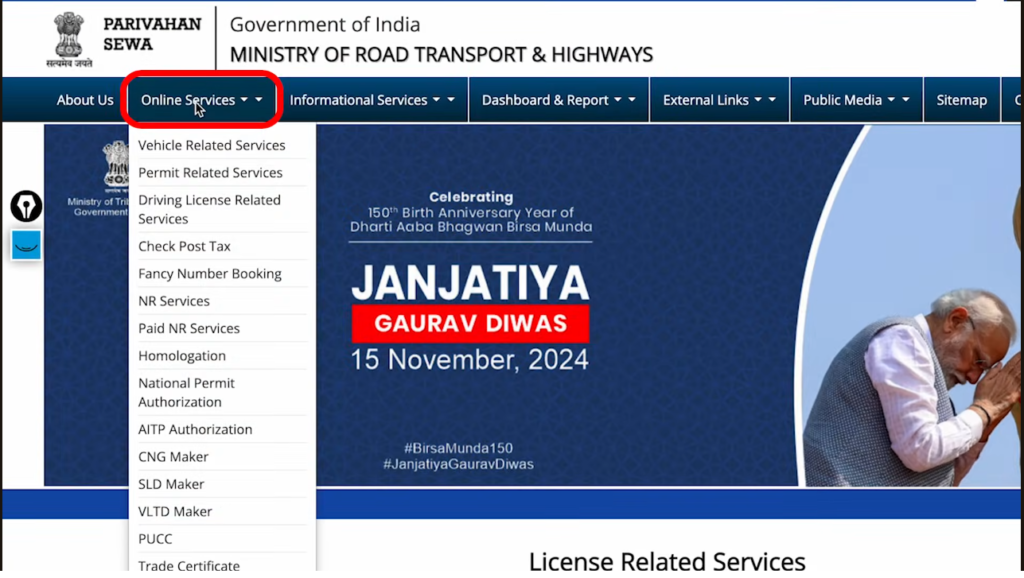
Step 2: Select Online Services
After opening the website, click on “Online Services” and then select the first option called “Vehicle Related Services”.
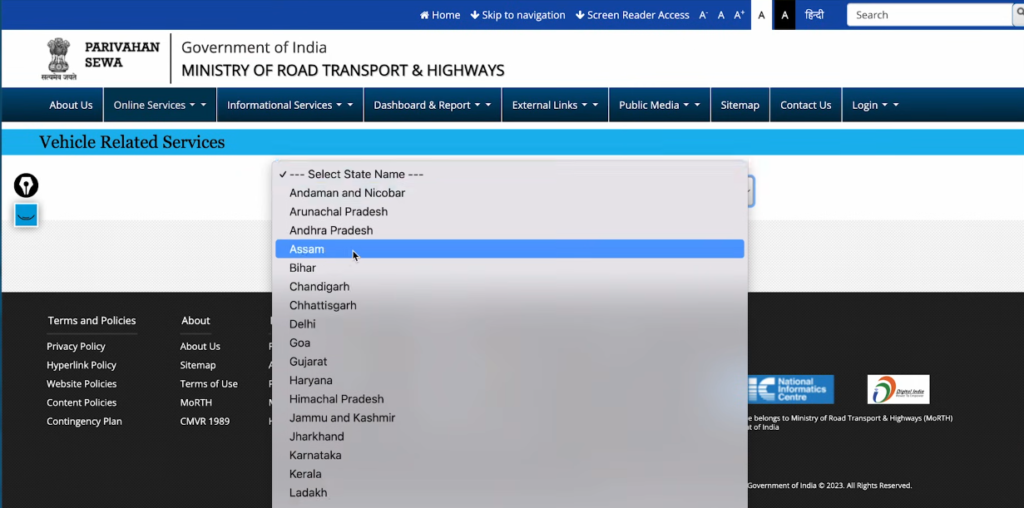
Step 3: Select State
Now, select your state from the list. In my case, I am selecting Punjab, but the process is the same for all states.
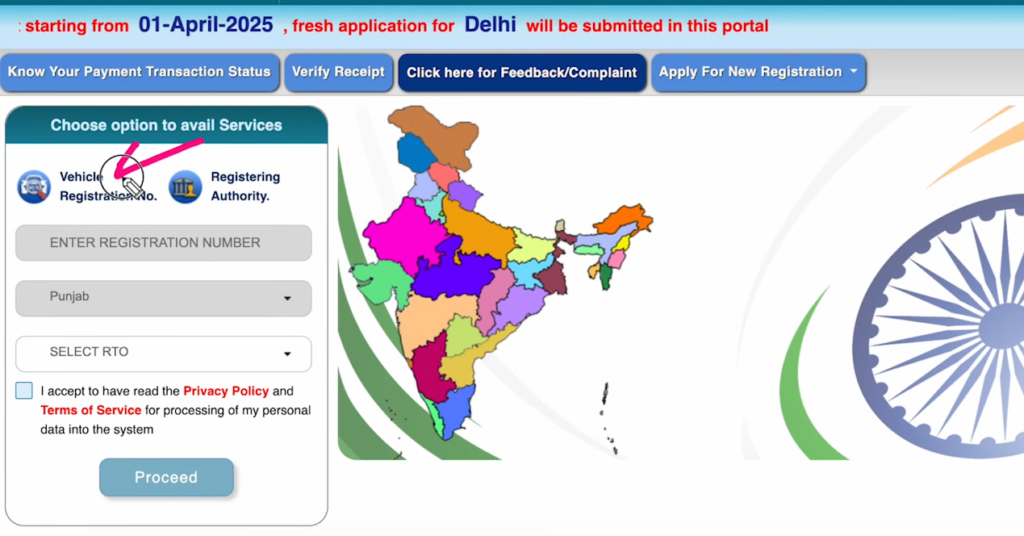
Step 4: Enter Vehicle Registration Number
Click on “Vehicle Registration”, enter your vehicle registration number, accept terms and conditions, and click on “Proceed”.
Step 5: Verify RTO Details
After clicking proceed, the RTO details like Punjab and Ludhiana will auto-fill, and no changes are required here.
Step 6: View Available Online Services
You will now see a list of vehicle-related services available online in your state, from which you must select “Hypothecation Termination”.
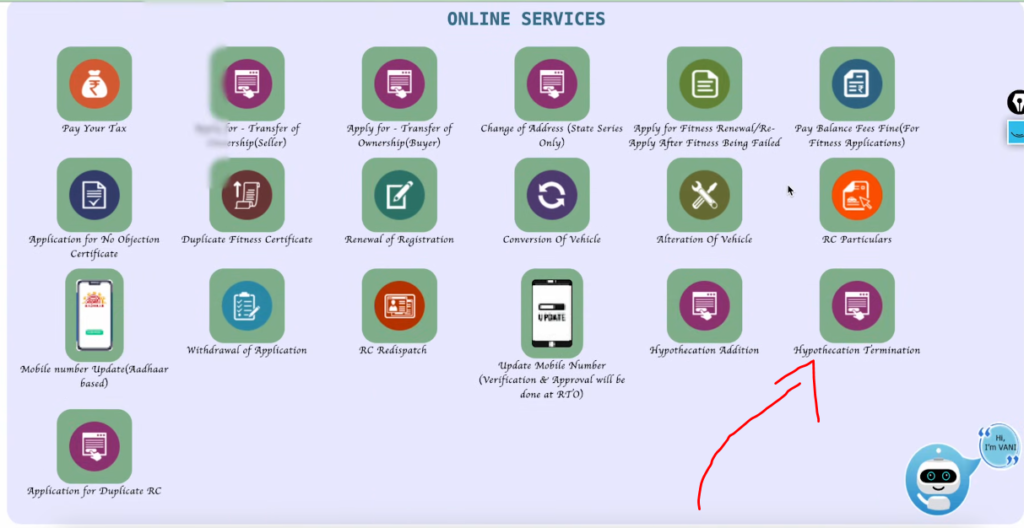
Step 7: Enter Chassis Number
Enter the last five characters of your vehicle’s chassis number, which you can find on the RC or directly on the vehicle.
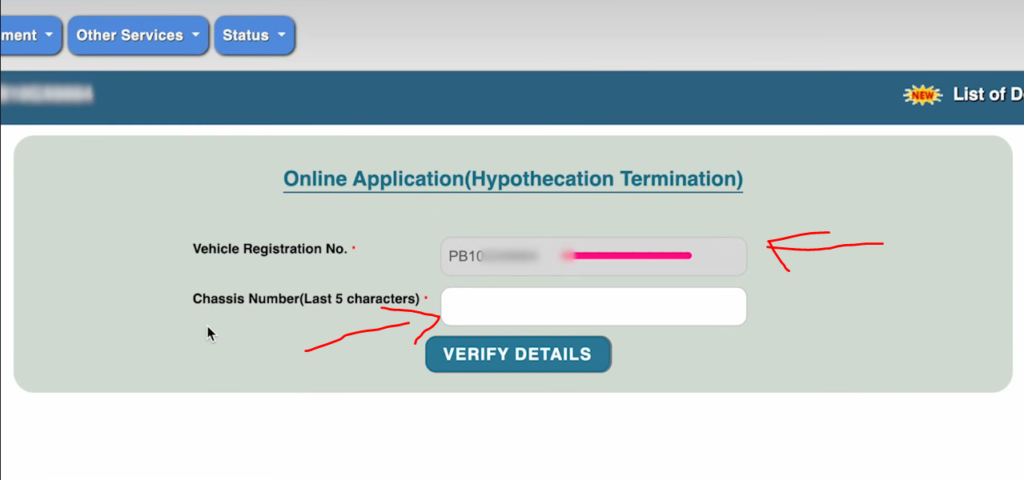
Step 8: Authentication Process
After verification, you will get two options for authentication: using mobile OTP or using Aadhaar OTP.
Step 9: OTP via Mobile or Aadhaar
If mobile OTP fails, you can authenticate using Aadhaar OTP by entering Aadhaar number and submitting the received OTP.
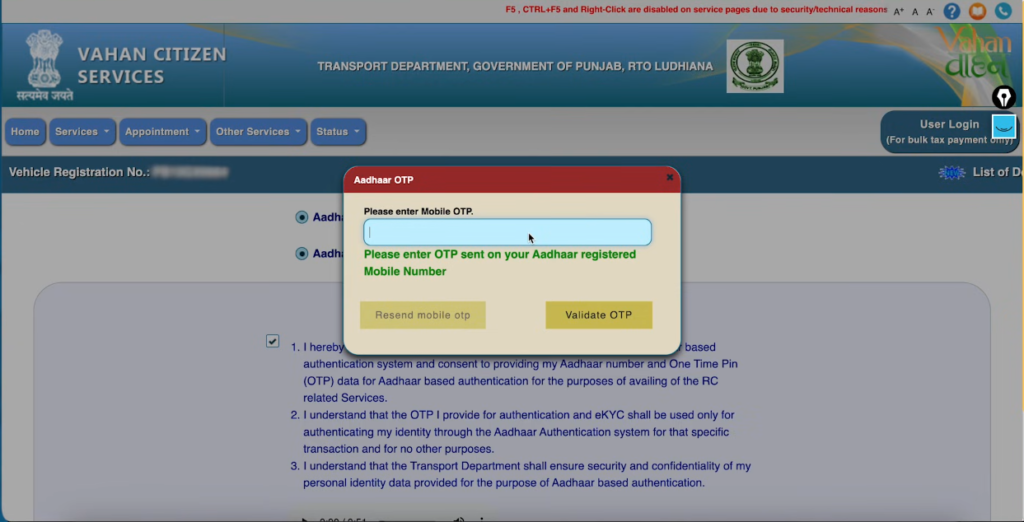
Step 10: Check Hypothecation Details
After successful authentication, you will see active hypothecation details, including the finance company name such as L&T Finance.
Step 11: Enter NOC Date
Click on termination, then enter the NOC date exactly as mentioned on the No Objection Certificate issued by the bank.
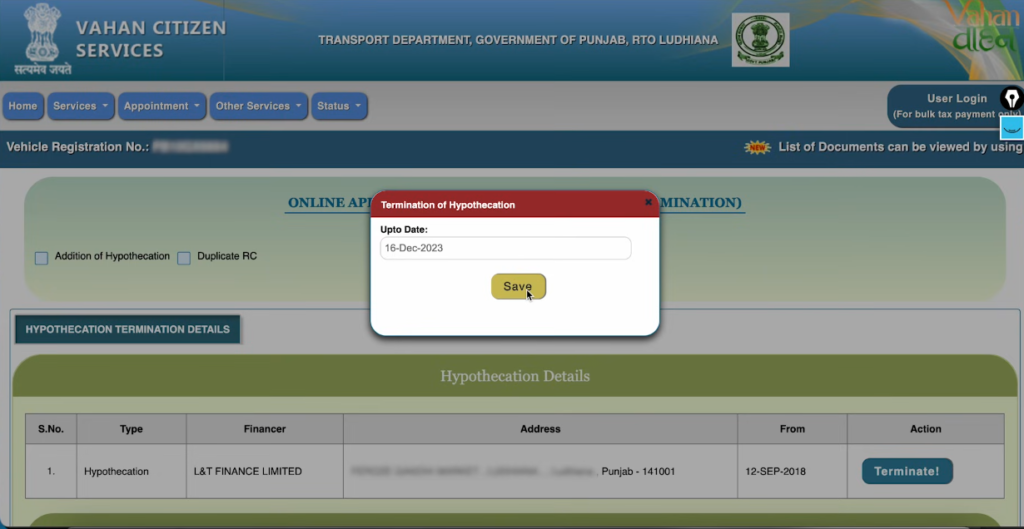
Step 12: Insurance Requirement
Active vehicle insurance is mandatory for this process; otherwise, you must renew insurance before proceeding further.
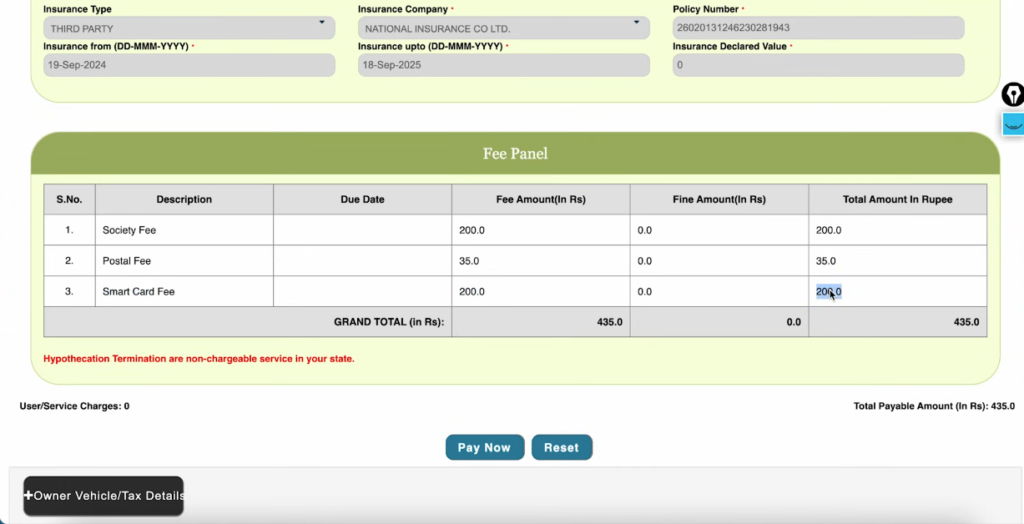
Step 13: Fee Details
The total fee shown is ₹435, including smart card fee ₹200, postal charge ₹35, and other applicable service charges.
Step 14: Online Payment
Click on “Pay Now”, agree to terms and conditions, select payment gateway, and complete the online payment successfully.
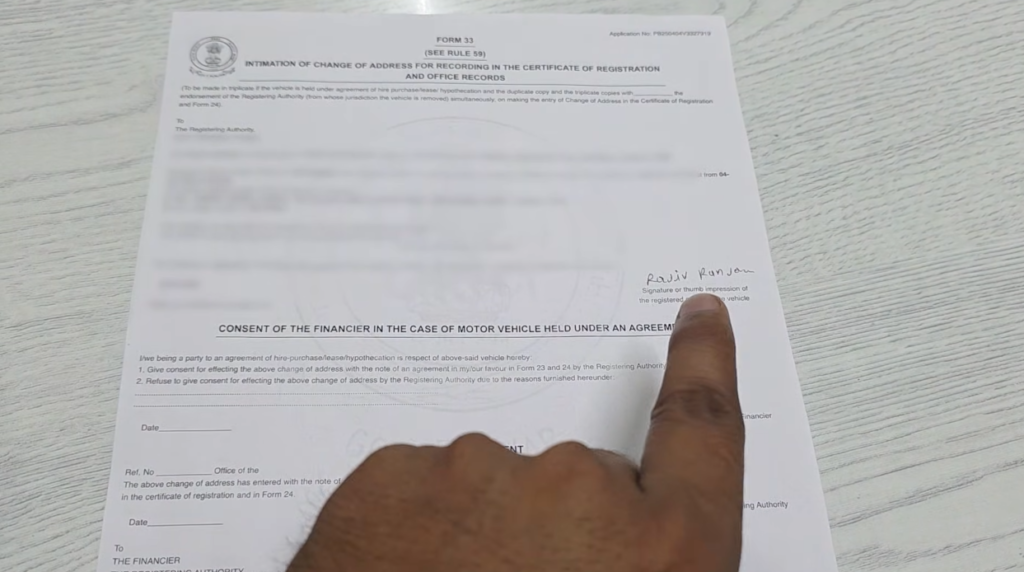
Step 15: Download Form 35
After payment, download and print Form 35, sign it properly, and keep it ready for uploading.
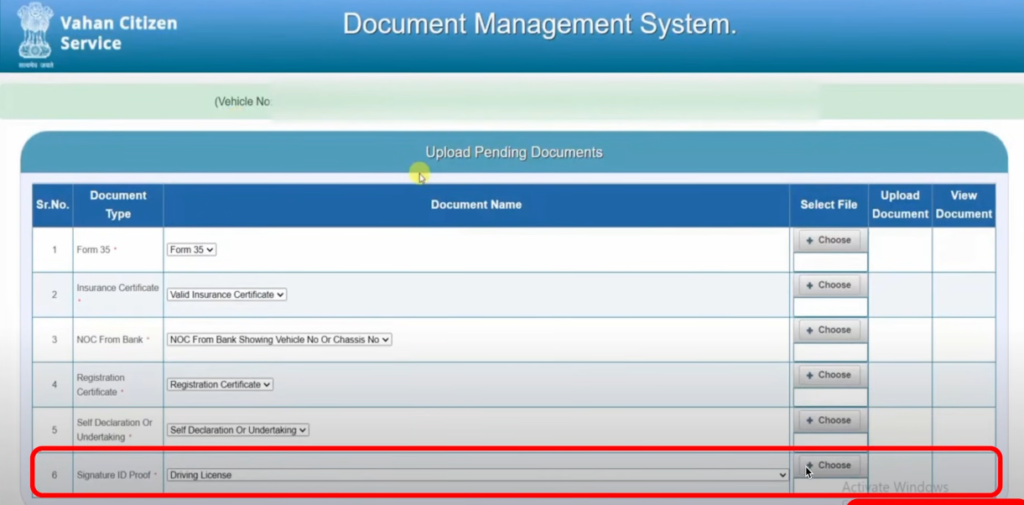
Step 16: Upload Required Documents
Upload signed Form 35, active insurance certificate, bank NOC, RC copy, self-declaration form, and driving license as ID proof.
Step 17: Self Declaration Form
Download the self-declaration form for your state by searching on Google, print it, fill required details, and sign it.
Step 18: Document Upload Tips
Ensure document file names do not contain spaces, otherwise the portal may reject the upload during submission.
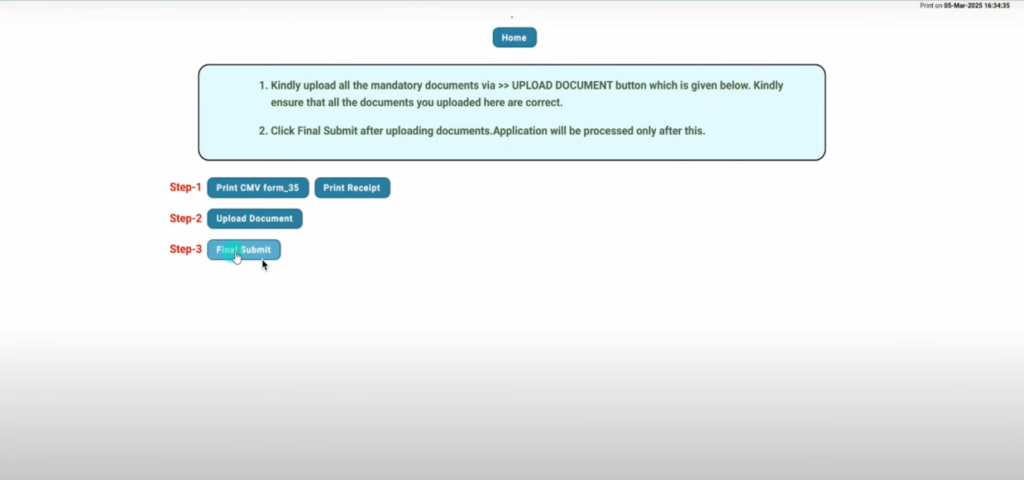
Step 19: Final Submission
After uploading all documents correctly, click on final submit and your application will be submitted successfully.
Step 20: Application Confirmation
You will receive the application number on both registered mobile number and email, and no RTO visit is required.
Why Hypothecation Removal (Loan Clearance) is Important
When you finish paying your loan, removing hypothecation becomes essential.
A. Legal Ownership: Removal gives you full and clear ownership of the vehicle. The RC will reflect only your name.
B. Selling or Transfer: With a clean RC (no lien), you can sell or transfer the vehicle easily; buyers prefer vehicles with no loan-linked record.
C. Clean Title: A vehicle with hypothecation removed has a “clean title,” which avoids legal or administrative issues later.
D. Insurance Claims & Renewals: Insurance companies and other authorities often expect a clear RC; hypothecation may complicate claims or renewals.
E. Resale Value: A vehicle with clean records often gets better resale value and finds buyers faster.
F. Peace of Mind: Once the lien is removed, your vehicle rights are completely yours no pending obligations to the financer.
Because of these reasons, hypothecation removal is not just a formality but an important legal step after the loan ends.
How to Remove Hypothecation via Offline (RTO Visit) Method
If online service is not available for your state, you can remove hypothecation by visiting your local RTO. The steps:
- Gather all required documents (as listed above: RC, NOC, Form 35, insurance, PUC, identity proof).
- Download or collect Form 35 from the RTO office or official site.
- Fill Form 35 correctly mention vehicle number, chassis number, agreement details, and sign (you and the lender must sign).
- Submit Form 35 along with all required documents and the original RC.
- Pay the hypothecation-removal fee (see next heading for typical charges).
- RTO will verify documents, and upon approval will update vehicle record and issue a new RC without hypothecation entry.
Offline method may take longer and need more visits depending on RTO workload but works everywhere regardless of online portal availability.
Hypothecation Terminal Online Status Check
Open Browser and Search Parivahan
First, you need to open your Chrome browser on your mobile or computer, and after opening it, search for Parivahan, where the official website parivahan.gov.in will appear in the search results.
Open Official Parivahan Website
As soon as you see the official Parivahan website, you have to tap on it, and after opening, an interface like this will appear with multiple options shown on the screen.
Go to Online Services
On the homepage, you will see the option called Online Services, and you need to tap on this option to proceed further with the process.
Select Vehicle Related Services
After clicking on Online Services, you have to tap on Vehicle Related Services, which will redirect you to the next page for further steps.
Select State and RTO
Now, you need to select your state according to your vehicle registration, and after selecting the state, you will be asked to search and select your RTO from the list provided.
Proceed with Selected Details
Once your RTO is selected, you have to tick the checkbox and tap on the Proceed option, and again you will see a Proceed option which you must tap to continue.
Know Your Application Status
After proceeding, you will be redirected to another page where, on the top side, you will see the Status option, and here you need to tap on Know Your Application Status.
Enter Vehicle Number or Application Number
Now, you will be asked to enter either your application number or your vehicle registration number, and if you have the vehicle number, you can select it, enter the number, fill in the captcha, and submit the details.
View Collection and Application Details
After submitting, all the collections or applications done on your vehicle will be shown, and you need to select the latest collection, such as the hypothecation removal application you recently submitted.
Check Current Status
Scroll down slightly, then scroll left on the third number, tap on Show Details, and here you will see the complete information along with the current status, such as “Application Pending at Hypothecation Approval at Fatehpur RTO”.
Final Status Information
This status means that your application has been verified and is currently pending approval at the RTO, and once it gets approved, the status will be updated automatically on the portal.
Typical Fees and Time Taken for Hypothecation Removal
The cost and time required for hypothecation removal vary by state and vehicle type. Some general data:
- In many states, the fee for cancellation of hypothecation using Form 35 is ₹100 only (especially in certain states’ official transport department pages).
- In other cases, depending on rules and vehicle type, fee may range higher some sources mention between ₹200 and ₹500.
- Processing time: If you apply online and documents are in order, many RTOs process the request within 7–15 working days.
- After verification, a new RC without the lien will be issued sometimes delivered by post or you may collect from RTO.
Because of small fee and moderate wait time, it’s advisable to start removal soon after you receive NOC from lender.
What Happens if You Do Not Remove Hypothecation
If you don’t remove hypothecation even after loan repayment, you may face the following problems:
- RC will still show the lender/financier’s name so legally the vehicle remains under lien.
- During sale or transfer, prospective buyer or new owner may face difficulty or may demand “clean RC” only reducing likelihood of sale or lowering resale value.
- Insurance renewals or transfer may need financiers’ involvement; this can be cumbersome.
- Administrative or legal procedures such as duplicate RC, change of address, resale etc. may be blocked or delayed until hypothecation is removed.
- Overall, you will not have full freedom and ownership rights over your vehicle despite loan being paid.
Hence skipping this step can lead to future complications and loss of benefits of full ownership.
How to Check If Hypothecation Is Removed
After submitting the application for termination, you should verify whether hypothecation is removed. Here’s how:
A. Use Parivahan Sewa portal (or your state transport portal) to “Know Your Application Status” enter vehicle number or application number.
B. Check updated RC details online if hypothecation removal is complete, lender’s name or “HP/hypothecation clause” should no longer appear
C. If you get a physical RC book or smart-card RC, ensure it does not show any hypothecation entry. That means you now hold full legal ownership.
D. Keep the acceptance receipt or payment acknowledgement for your records useful evidence if any issue arises later.
If hypothecation is not removed even after processing time, contact your RTO or check if any document was missing or wrongly submitted.
Frequently Asked Questions
1) What is hypothecation termination?
It is the process of removing the lender’s (bank or finance company) hypothecation entry from your vehicle’s Registration Certificate after you fully repay your loan. This shows you as the sole owner of the vehicle.
2) Can I get hypothecation termination online?
Yes, you can start and submit the hypothecation termination application online through the Parivahan portal, upload documents, and pay the fee. You may still need to visit the RTO for document verification.
3) What is Form 35 for hypothecation?
Form 35 is the official RTO form called “Notice of Termination of an Agreement of Hire-Purchase/Lease/Hypothecation,” used to legally cancel the hypothecation on your RC.
4) How much time for hypothecation termination?
After submission and verification, the process typically takes about 7 to 14 working days to complete and issue the updated RC.
5) Is original RC required for hypothecation removal?
Yes. The original Registration Certificate must be submitted when applying for hypothecation termination, online or offline
6. What are hypothecation fees?
When you apply to remove hypothecation from your vehicle’s RC, the RTO charges a small processing fee. In most states this is around ₹100 to ₹500, depending on your RTO and whether postal or notary charges are included.
7 What is the validity of NOC for hypothecation termination?
The No Objection Certificate (NOC) from your bank or lender usually remains valid for about 90 days from the date it is issued. If you delay beyond that, you may need a fresh NOC.
8. What are the risks of hypothecation?
If hypothecation is still active:
- The bank still has a lien on your vehicle until it’s removed.
- You may not be able to sell or transfer the vehicle easily.
- Insurance claims or ownership changes can be more complicated because the lender’s name remains on the RC