
Sarathi is the official online portal of the Government of India for Driving Licence (DL) services. It is managed by the Ministry of Road Transport and Highways. Through Sarathi, citizens can apply for a Learner Licence (LL), Driving Licence (DL), renewal, duplicate DL, address change, and more.
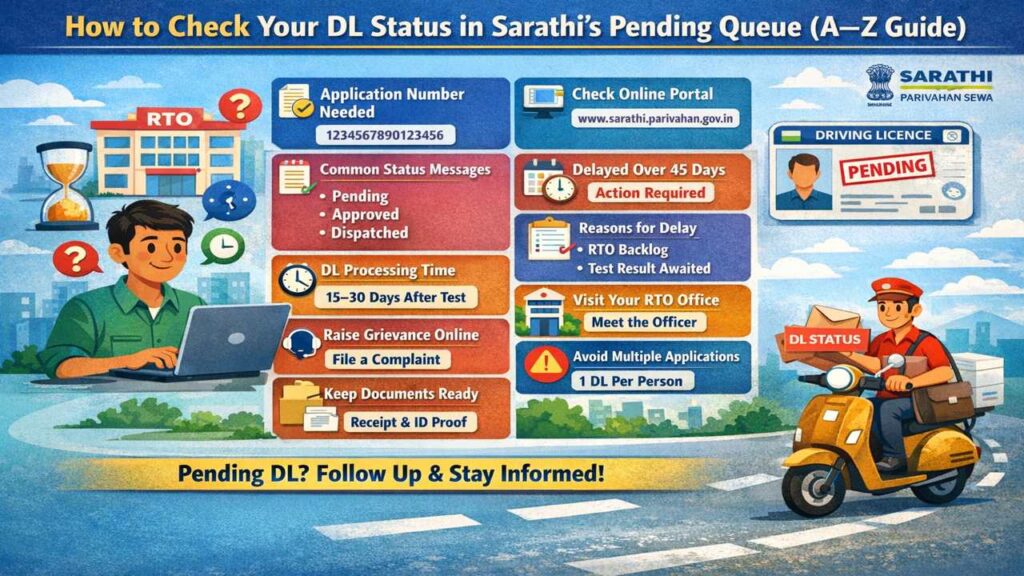
Checking your DL status is very important because many applications remain in the pending queue. Every year, more than 2 crore DL-related applications are processed in India. Due to high volume, technical checks, and RTO verification, delays are common.
If your DL is pending, you may face problems such as:
Parivahan Quick Actions (Official Links)
Use official government portals and apps for driving licence and vehicle related services.
This is an informational website. All buttons redirect to official government platforms.- Not receiving your DL even after 30–45 days
- Application stuck at RTO level
- Verification not completed
By checking your status regularly, you can understand where your application is stuck and what action is needed. This saves time, money, and repeated visits to the RTO office.
Trade Certificate Parivahan Apply online 2026, Docs & Eligibility
Understanding the DL Pending Queue Meaning
The “pending queue” means your DL application is waiting at one or more stages for approval or processing. This does not mean rejection. It only means the process is not completed yet.
Common pending stages include:
- Application scrutiny
- Document verification
- Biometrics approval
- Driving test result update
- DL printing approval
On average, a DL application passes through 5–7 stages. If any one stage is delayed, your application goes into a pending queue.
As per official data, around 20–25% of applications remain pending beyond the expected timeline due to:
- High application load
- Missing documents
- Test result not uploaded
- Officer approval delay
Understanding this helps you take the right next step instead of reapplying again.
Documents and Details Required to Check DL Status (E–F)
Before checking your DL status, keep the following details ready. Without these, the status cannot be fetched correctly.
Required details:
- Application Number (15–16 digits)
- Date of Birth (DD-MM-YYYY format)
- Captcha code (security verification)
Optional but helpful:
- Learner Licence Number
- Mobile number linked with application
- State and RTO name
The application number is provided when you submit your DL form online. It is also sent via SMS to your registered mobile number.
Tip: If you lost your application number, you can retrieve it using your name and date of birth on the portal.
Correct details ensure accurate status results and avoid errors during checking.
Stage and Passenger Vehicle Permits 2026 :Rules, Types, Fees
Step-by-Step Process to Check DL Status Online
Follow these steps carefully to check your DL pending status:
- Visit the official Sarathi website
- Click on “Application Status”
- Select Driving Licence Related Services
- Enter your Application Number
- Enter your Date of Birth
- Fill the captcha and submit
Within 5–10 seconds, your DL status will appear on the screen.
You will see:
- Current processing stage
- Pending authority (RTO/State level)
- Remarks (if any)
- Last updated date
The system is available 24×7, except during maintenance hours (usually 12 AM–2 AM).
Always check status using a stable internet connection to avoid errors.
Different DL Status Messages and Their Meaning
While checking your status, you may see different messages. Understanding them is very important.
Common status messages:
- Application Under Scrutiny: Documents under review
- Pending at RTO Level: Approval required from RTO officer
- Test Result Awaited: Driving test result not uploaded
- Approved: DL approved, printing pending
- Dispatched: DL sent via Speed Post
- Rejected: Application rejected (reason mentioned)
Usually, after approval, DL printing takes 7–10 working days, and delivery takes another 7–15 days.
If your status does not change for more than 30 days, action is required.
Vehicle Green Sewa Requirment 2026, Scheme Value
Reasons Why Your DL Is Stuck in Pending Queue
There are many reasons why a DL application stays pending. The most common ones are:
- High workload at RTO (especially in metro cities)
- Driving test result not uploaded
- Officer not approving application
- Mismatch in documents
- Biometric failure
- Server or technical issue
In India, a single RTO may handle 500–1,000 applications per day, which causes delays.
Festival seasons and financial year-end months (March–April) see the highest delays.
Knowing the reason helps you decide whether to wait or take action.
How Long Does DL Processing Normally Take?
As per government guidelines, DL processing time is:
- Learner Licence: 7–10 days
- Permanent DL after test: 15–30 days
- Renewal or duplicate DL: 10–20 days
However, in real cases:
- Urban RTOs may take up to 45 days
- Rural RTOs usually complete within 20–25 days
If your DL is pending for more than 45 days, it is considered delayed.
Always note the last updated date shown in status to calculate delay correctly.
What to Do If Your DL Is Pending for Too Long
If your DL is pending beyond normal time, follow these steps:
- Visit your concerned RTO with application receipt
- Meet the DL section clerk
- Submit a written request if required
- Carry original documents
- Ask for exact pending reason
You can also:
- Raise a grievance on the portal
- Call the state transport helpline
- Email the RTO office
In most cases, manual follow-up resolves the issue within 7–10 days.
Avoid agents unless absolutely necessary.
All India Tourist Permit 2026 Renewal, Prices & Rules
Common Mistakes to Avoid While Checking DL Status
Many applicants make small mistakes that cause confusion:
- Entering wrong application number
- Using incorrect date format
- Checking status too frequently
- Applying again without resolving pending issue
- Ignoring SMS updates
Do not submit multiple applications. One DL application per person is allowed. Duplicate applications may cause rejection.
Always keep:
- A printed application receipt
- SMS confirmation
- Payment receipt
These act as proof if any issue arises.